- 150 AI credits / month up to 30 SOPs and guides
- ViviScape AI writes them for you
- Screenshots with click markers
- Edit, regenerate and export
- Your library in ViviScape Work
Do it once. Get the SOP or guide.
Record yourself doing a task on your computer and talk through it as you go. ViviScape Recorder captures every click, keystroke and word, and ViviScape AI turns it into an illustrated, step-by-step guide your whole team can follow.
What’s an SOP? A standard operating procedure: written, step-by-step instructions for doing a task the same way every time.
Windows · from $15 / month · Already on ViviScape Work? It’s included with your AI credits.
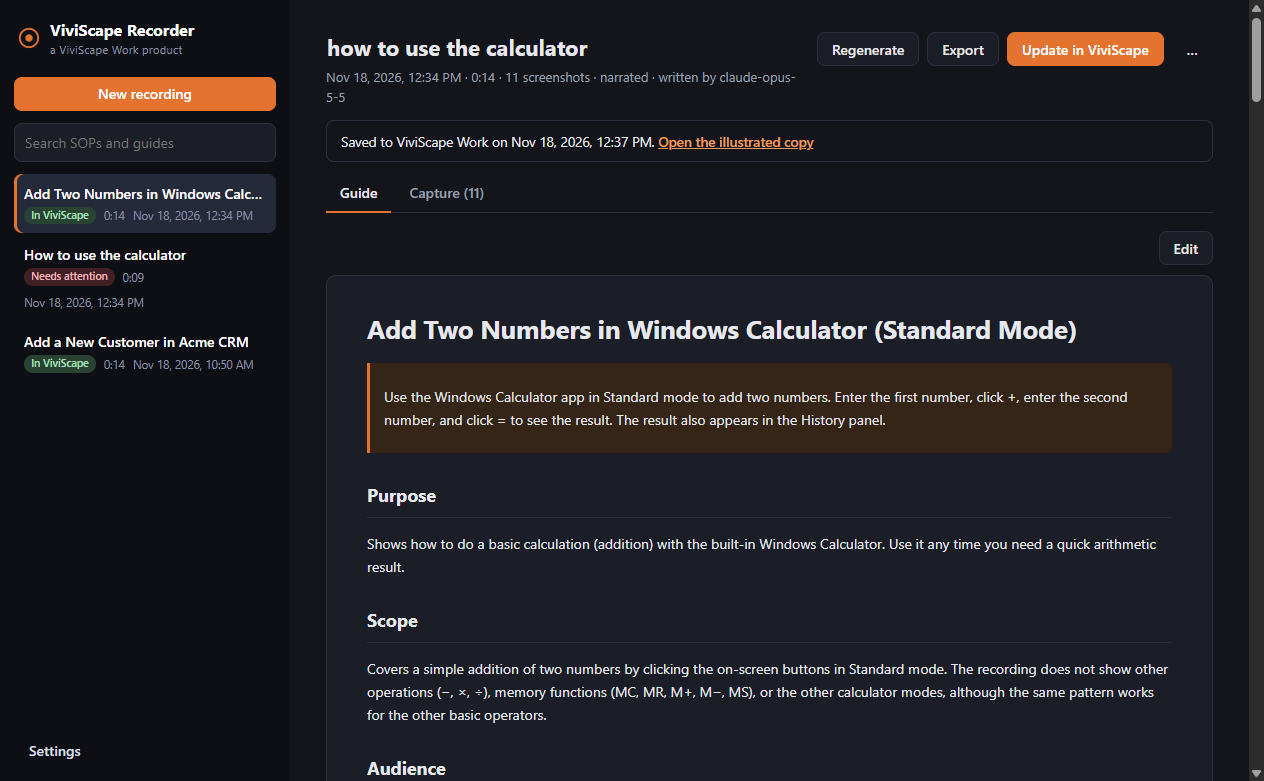
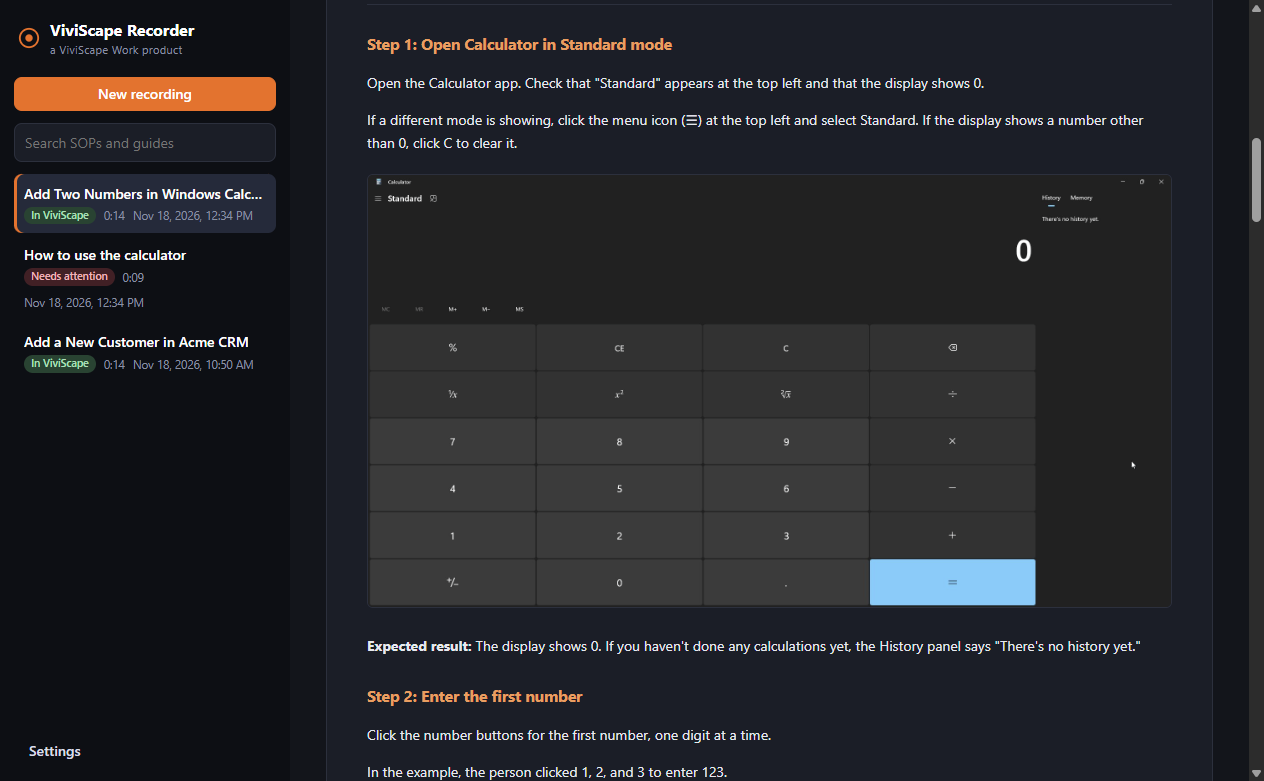
A real guide, written from a 14-second recording.
Three steps. No writing.
You do the work you already do. Recorder handles the documentation.
Record
Press start and do the task. Each click takes a screenshot with the spot you clicked marked, and your narration explains the why.
ViviScape AI writes it
Stop, and in a minute or two you have numbered steps that name the real buttons and fields, with screenshots, expected results and warnings.
Review and share
Edit anything, or ask for a rewrite (“shorter,” “for new hires”). Then share it, export it, or save it to your library.
Documentation that writes itself, and stays editable.
Every click, captured
A screenshot at each click, shortcut or marked step, with the click circled. Record your whole screen or a single window.
Your voice adds the why
Talk as you work. Narration is transcribed on your PC and folded into the steps: which values to use, rules and exceptions.
Written by ViviScape AI
Purpose, prerequisites, steps, expected results, warnings and troubleshooting. One-off data is generalized, and passwords are never copied in.
Edit or regenerate
Change any word, or regenerate with new direction. Your recording is kept, so you never have to do the task again.
Your SOP library
Save to ViviScape Work: an illustrated copy for your library and searchable text for your team. Or export to Markdown or HTML.
Out of your way
Global shortcuts to start, pause and mark steps, a tray icon, crash recovery, and automatic updates.
Anyone who explains the same task twice.
- Onboarding: hand new hires the exact steps, not a shadowing session.
- IT and MSPs: runbooks and client how-tos captured as you fix things.
- Operations and finance: month-end, billing and approvals done the same way every time.
- Support: answers customers can follow, with screenshots.
- Compliance: documented procedures that are easy to keep current.
Start for $15 a month.
No ViviScape Work subscription needed. Save 20% with annual billing.
- 1,000 AI credits / month up to 200 SOPs and guides
- Everything in Creator
- High-quality mode
- Branded exports
- Priority support
Already use ViviScape Work? You don’t need a Recorder plan. Download Recorder and sign in with your Work account. Your SOPs and guides use your account’s AI credits.
ViviScape Recorder questions
What is ViviScape Recorder?
ViviScape Recorder is a Windows app that turns a recording of you doing a task into an editable, illustrated step-by-step guide or standard operating procedure (SOP). It captures a screenshot at every click, the text you type and your narration, and ViviScape AI writes the steps from them.
What is an SOP?
An SOP (standard operating procedure) is a written, step-by-step set of instructions for doing a task the same way every time. ViviScape Recorder writes them for you, with a screenshot for each step and the button you clicked marked on it.
How much does ViviScape Recorder cost?
ViviScape Recorder Creator is $15 a month ($144 a year) with 150 AI credits a month, up to 30 SOPs and guides. Recorder Pro is $100 a month ($960 a year) with 1,000 AI credits a month, up to 200 SOPs and guides, plus high-quality mode, branded exports and priority support.
Do I need a ViviScape Work subscription to use Recorder?
No. Recorder Creator and Pro are standalone plans, so you don't need a ViviScape Work plan. If you already have ViviScape Work, you don't need a Recorder plan either: download the app, sign in with your Work account, and your SOPs and guides use your account's AI credits.
How do AI credits work in ViviScape Recorder?
A standard SOP or guide uses 5 credits, and a large one (more than 40 screenshots) uses 10. If writing one fails, you aren't charged. Credits reset on the 1st of each month, and you can add a credit pack at any time.
Is my narration sent to the cloud?
No. ViviScape Recorder transcribes your narration on your own PC. The transcript, your screenshots and the typed text are sent to ViviScape AI only to write the SOP or guide. If you don't want something typed recorded, pause the recording or turn off typed-text capture in Settings.
What happens to my SOPs and guides if I cancel?
They stay yours. Everything you record is saved on your PC, where you can still open, edit and export it to Markdown or HTML after you cancel. Only writing new SOPs and guides with ViviScape AI needs an active plan.
Which computers does ViviScape Recorder run on?
ViviScape Recorder runs on Windows 10 and Windows 11 (64-bit). It can record your whole screen or a single window, and it updates itself when a new version comes out.
Stop explaining it. Record it once.
Your next SOP or guide is one recording away.